October 30, 2026
From Make.com to CodeFlowX: A Booking System Built for Client Follow-Up
One admin workspace for verified bookings, separate meeting invitations, scheduled follow-ups, private reminders and delivery evidence—with Supabase scheduling and a controlled Make.com fallback.
- Visitor
- Next.js booking flow
- Supabase: bookings + event queue
- Supabase cron: every 5 minutes
- Authenticated website worker
- Resend + Telegram + Google Sheets
- Admin workspace
- Meetings + follow-ups + private reminders
- Delivery history + retries
- Shared invitation
- Website access check
- Separate Jitsi room
- Manual legacy rollback
- Make.com
- Legacy booking events only
A booking form was only the beginning
I built CodeFlowX’s booking system for the way I actually work with clients: a first enquiry, a discovery conversation, a proposal, another meeting, and a series of follow-ups. Reserving a calendar slot solved only the first part. I also needed to know which requests needed approval, which messages had really been sent, and what I had promised to do next.
This is an in-house product case study. I designed and implemented the visitor experience, admin workspace, database workflows, and notification delivery. The result brings verified bookings, multiple meeting invitations, scheduled emails, and private reminders into the portfolio website I use every day.
The screenshots below were taken in desktop mode with the website’s light theme, using demonstration records and cropping some views to the relevant controls. They show the real interface without exposing client information, and they are not evidence of messages delivered to real customers.
Starting with Make.com, then moving delivery into the website
The first automation ran through Make.com. It was a practical way to connect booking events, emails, Telegram notifications, and a spreadsheet record while I worked out the process. That version helped expose the different events the system needed to handle: new bookings, cancellations, rescheduling, reminders, and follow-ups.
As the workflow grew, routine polling and multiple integration steps became an ongoing use of Make operations. I moved the main delivery work into the website so I could reduce that dependency and manage the client relationship in one place. The goal was lower orchestration overhead and clearer control; I do not claim a measured percentage or cash saving without usage and billing data.
The Make automation remains a controlled fallback for the older booking-event workflow. It is a manual rollback path, rather than automatic failover for every feature. When direct website delivery is enabled, the legacy Make endpoint refuses polling, preventing both systems from sending the same queue. New meeting invitations, scheduled follow-ups, and private reminders belong to the direct delivery path.
The architecture: save the work before trying to send it
The website runs on Next.js and Vercel, with Supabase storing bookings, visitor records, meeting invitations, and notification events. Booking changes create their notification events in the same database transaction. That matters when an email provider is unavailable: the booking can remain saved and the pending delivery can be retried.
- Next.js: visitor booking pages, authenticated admin actions, meeting entry pages, and the notification worker.
- Supabase: durable records, transaction checks, queue claims, scheduling state, and private access controls.
- Resend: verification and client emails, provider identifiers, and signed delivery-event callbacks.
- Telegram: operational alerts and optional private next-step reminders.
- Google Sheets: an operational copy of booking records, updated through the configured Sheets integration independently of email delivery.
- Jitsi: the video call behind each managed website invitation.
Credentials stay on the server. Visitor management links and meeting tokens serve different purposes, and ordinary visitors cannot read private notes or call admin database functions. The website deploys through the existing GitHub-to-Vercel integration.
Why the scheduler moved to Supabase
I moved the recurring trigger to Supabase instead of relying on Vercel Cron. The project uses Vercel’s Hobby plan, and a queue for reminders and scheduled messages needs a practical cadence. Supabase’s scheduler runs every five minutes and calls an authenticated worker endpoint on the website.
Supabase owns the clock; Vercel still runs the worker when called. Moving the trigger does not remove Vercel function usage. At a five-minute cadence, the baseline is about 8,640 checks in a 30-day month, before normal website traffic and manual actions. That is a capacity-planning number, not a promise that every provider will always stay inside its free allowance.
The worker selects a bounded batch of due notifications. An email scheduled for a particular time becomes eligible then and is normally picked up on a subsequent scheduler run; it is not a guarantee of delivery at the exact second. Backlogs, provider failures, and a paused scheduler can add delay.
A pause/resume control in the admin makes that behavior explicit. Pausing leaves pending work in the queue and blocks automatic claims. Manual sends and manual retries remain available. Resuming allows due work to continue without rebuilding the schedule.
Booking rules that reflect a real conversation
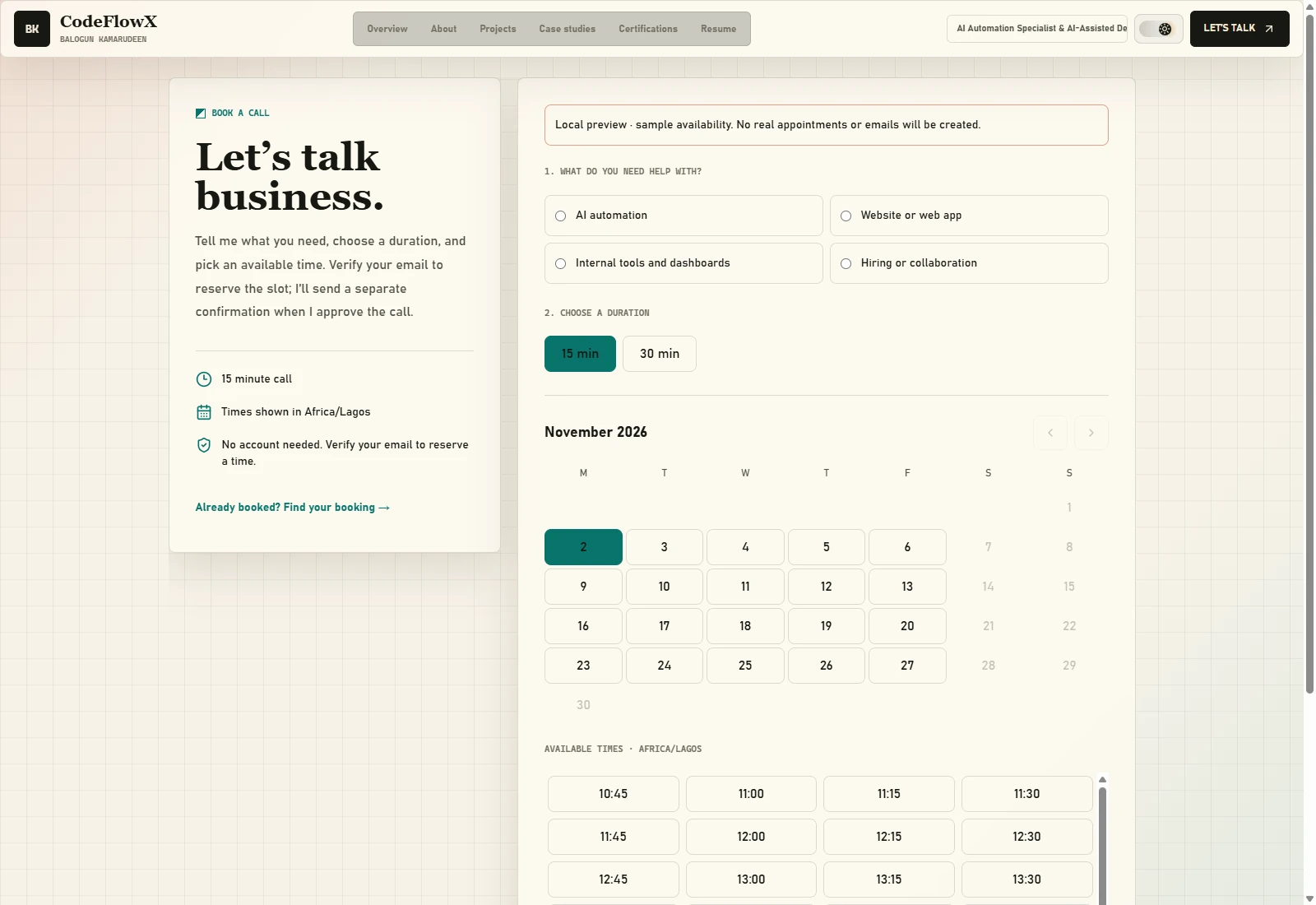
A visitor selects a service and available time, then verifies their email to reserve the appointment. The server validates availability, notice periods, duration rules, and overlapping appointments. A booking code helps the visitor find their reservation, but managing it still requires email verification or their private management link.
A reserved appointment begins as pending. Before approval, the visitor can manage it directly. After approval, cancellation and rescheduling become requests for review, so a confirmed appointment does not silently disappear from the working day. The original time remains in place until the requested change is accepted. Calendar downloads and a Google Calendar link help the visitor carry the confirmed details into their own calendar.
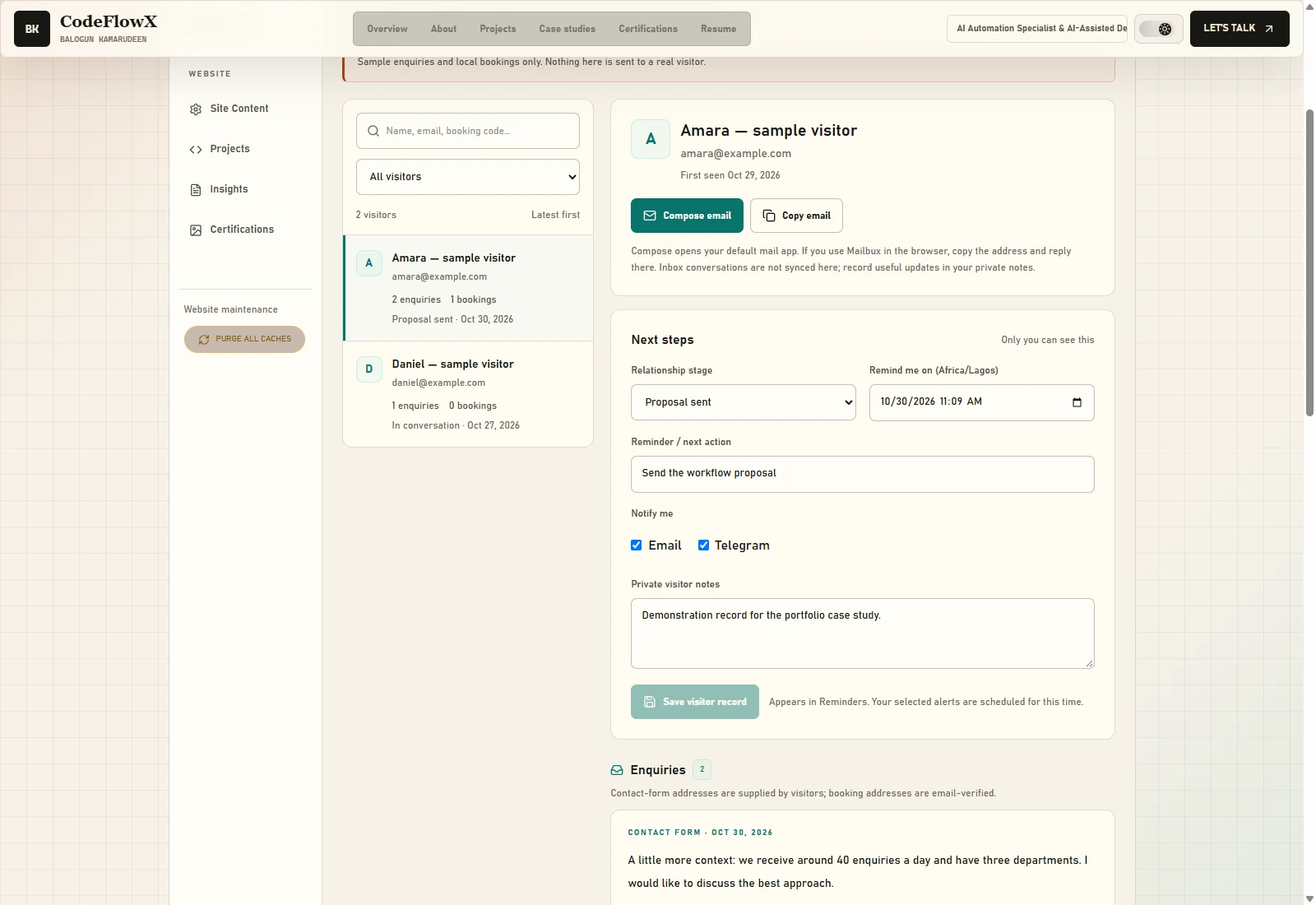
The admin brings enquiries and bookings together by visitor, with private notes and relationship stages. It also separates attendance from guesswork: the end of a time slot or an opened meeting link does not prove that somebody attended or missed the call. Attendance is recorded explicitly.
Fixing meeting links that gave no useful feedback
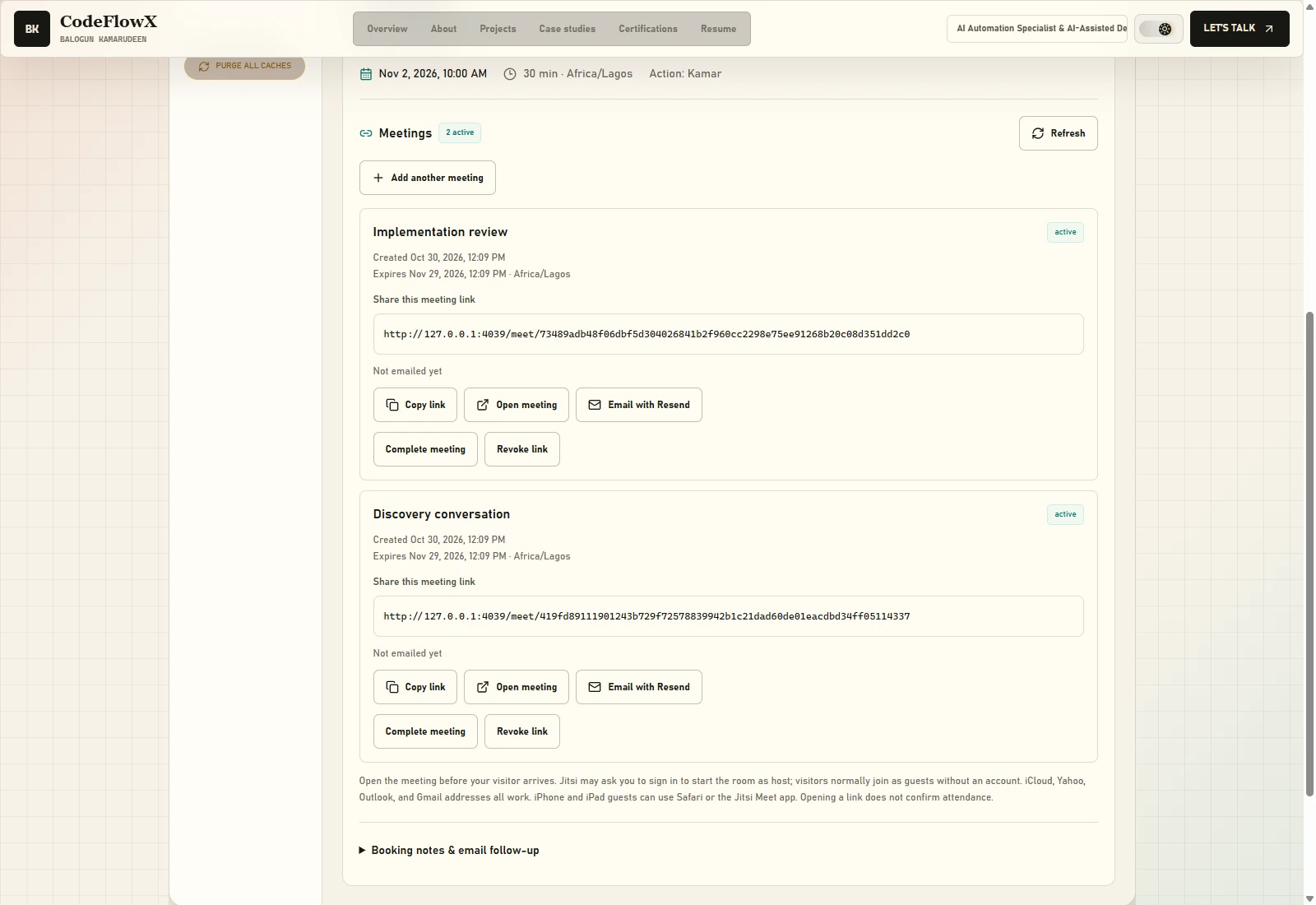
One of the clearest usability failures appeared in daily use: clicking “Generate meeting link” seemed to reload the page and return to the same view. The visitor-history response did not include the saved meeting fields, so the interface could not reliably show the result after loading the record. The earlier room name was also derived from the booking code, which was a poor fit for repeated conversations with the same person.
I replaced that experience with managed, named invitations. Each meeting gets a distinct website token and its own Jitsi room. Creation immediately displays the generated link, a success message, and actions to copy it, open it, or email it through Resend. The admin can create a discovery meeting and a later implementation review under the same client record, with separate expiry dates and history.
Completing or revoking an invitation disables its website entry link while retaining its history. Expiry is checked by the server when the link is used, so it does not depend on a later cleanup job. Cancelling the underlying booking closes its active invitations.
There is a deliberate boundary: these controls govern the website invitation. They cannot terminate a call already running in Jitsi or invalidate a direct Jitsi room URL somebody copied earlier. The host may also need to sign in to Jitsi. I made those limits visible in the admin rather than presenting revocation as stronger than it is. Creating another invitation also does not reserve another calendar slot; the next meeting time must still be agreed.
“Queued” and “delivered” are different states
The first follow-up flow had a credibility problem: a queued message could look sent even though no delivery had completed. A single success flag was not enough, especially with email, Telegram, and Sheets involved in one workflow.
I separated the notification record from the outcome of each delivery channel. A message now has a scheduled time, attempt history, cancellation state, and provider evidence. Resend accepting an email means the provider has accepted it for processing. It does not yet mean the recipient received it. Signed Resend callbacks can advance the record to delivered, bounced, or complained. Without that callback evidence, the interface keeps the more precise “Accepted by Resend” label.
Email, Telegram, and Sheets are attempted independently. A spreadsheet failure should not stop a client email, and a Telegram failure should not cause an already accepted email to be sent again. An old status with no supporting delivery record is labelled as unverified rather than being turned into invented proof.
Follow-ups can stand on their own
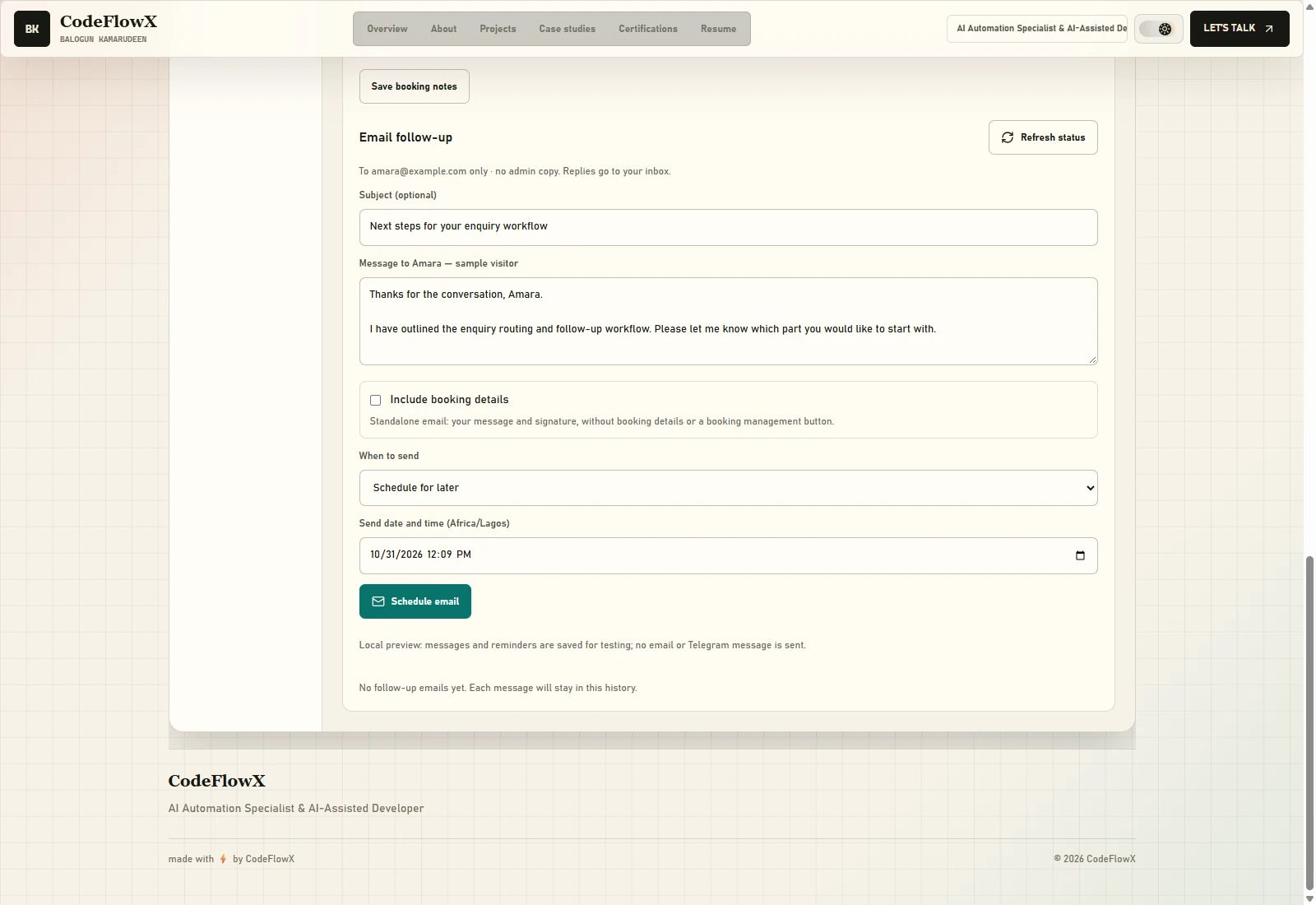
A proposal follow-up is often a new conversation, not another booking receipt. I made a standalone email the default: a subject, greeting, message, and branded signature, without the booking code, appointment card, or booking-management button.
An explicit “Include booking details” option adds that context when it is useful. The selected format and subject are saved with the queued event, so a scheduled send or retry uses the original choice. Existing queued messages keep their original layout rather than changing after an update.
The same review exposed unnecessary admin copies. The older queue requested an owner email for almost every action, including approval and legacy follow-up events. Recipient routing now distinguishes outgoing client mail from incoming work: approvals, meeting invitations, routine visitor reminders, and follow-ups do not request an extra admin email. New booking requests, visitor changes, attendance reviews, and enabled private reminders still notify the owner. Replies to client emails continue to go to the configured reply address.
Private next steps need a place to surface
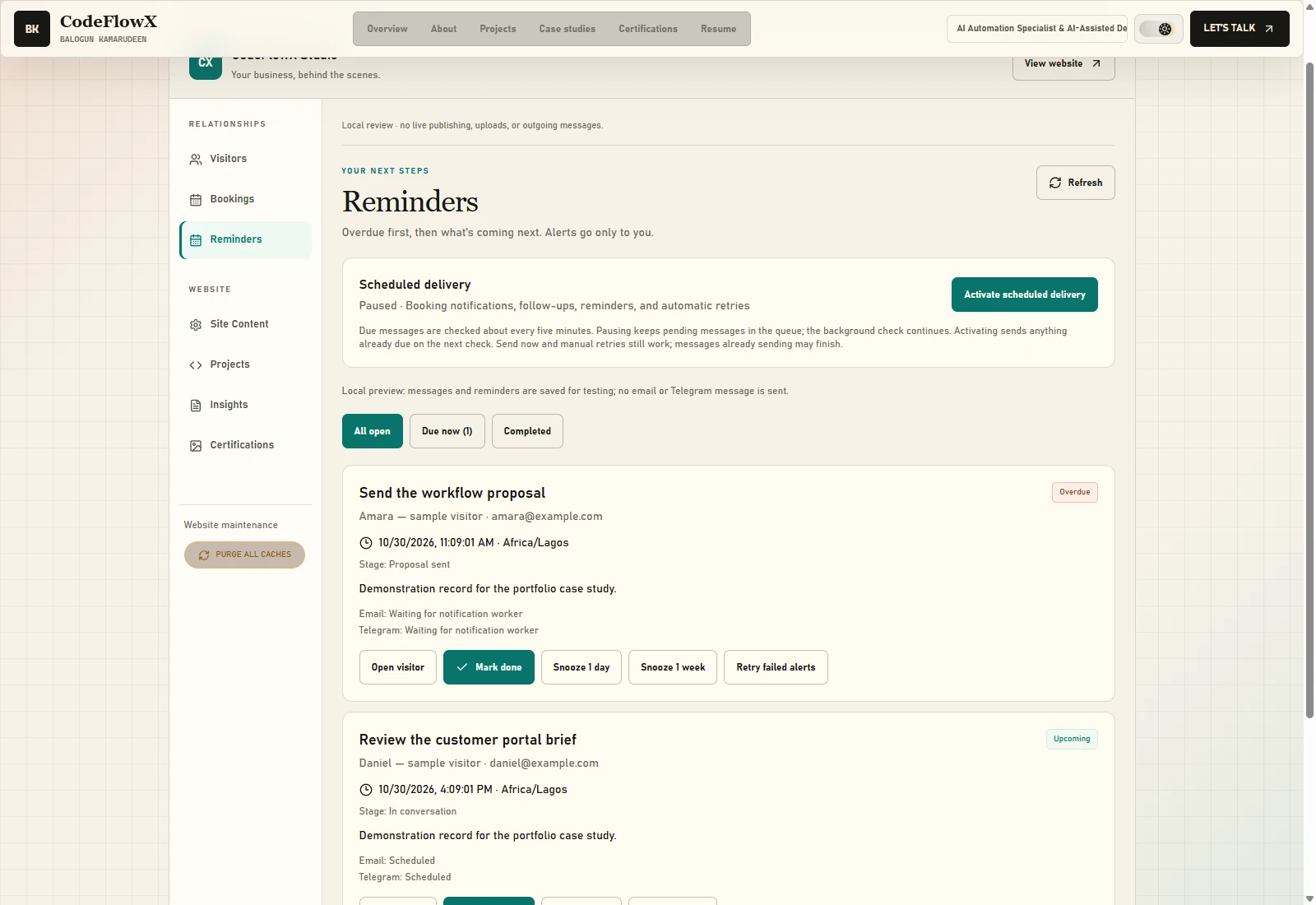
A private next-step card is only useful if its reminders do not disappear inside individual client records. I added a dedicated Reminders tab that puts overdue work first and shows the next action alongside the visitor’s relationship stage.
Each reminder has its own due time and optional email and Telegram alerts. The admin can snooze it, mark it complete, open the corresponding visitor, or retry failed alerts. Completing or changing a reminder retires stale pending notifications, while ordinary note edits do not create duplicate reminders. These messages are owner-only; private client notes are not sent to the visitor.
Recovery is part of the workflow
Provider outages and interrupted requests are ordinary failure modes. The direct worker uses a temporary database claim to reduce overlapping work, tracks channels separately, and retries failed attempts with increasing delays up to five attempts. Failed work remains visible for manual review and retry instead of disappearing.
Resend requests use stable idempotency keys for each event and recipient channel. Within the provider’s idempotency window, retrying an interrupted request can recover the original result without creating another email. The worker stops automatic resend attempts when an unresolved email attempt is too old to retry safely and marks the outcome unconfirmed for review. Idempotency is a bounded safeguard, not a universal exactly-once guarantee.
Telegram has a different constraint: if Telegram accepts a message but its response is lost, a later retry can produce a duplicate. I keep that limitation explicit. Cancellation also has a clear meaning: a pending email can be cancelled, but a message already accepted by the provider cannot be recalled.
Updating an existing system without losing its history
The database was already in use, and earlier schema changes had been applied manually. Replaying an entire setup script would have made the upgrade harder to reason about. I checked the installed structure and applied incremental changes that preserved existing bookings and visitor records.
The follow-up format enhancement adds a separate database entry point while keeping the previous one available during deployment. Old queued payloads still render correctly. The recipient update closes unnecessary pending admin-copy channels without rewriting actual delivery receipts. Neither update changes the Supabase cron configuration or the admin’s scheduling choice.
Validation covers database permissions, duplicate requests, queue claims, early scheduled sends, meeting expiry and revocation, provider failures, webhook signatures, retry windows, and recipient routing. Desktop interaction checks cover the visible meeting links, standalone follow-up default, optional booking context, and reminder workspace. The owner’s successful use of the earlier deployed workflow supplied practical feedback for these refinements; automated checks and sample screenshots complement that feedback rather than substitute for real provider monitoring.
What changed in practice
The booking page now connects to the work that follows it. I can see the invitation I created, keep multiple conversations separate, choose whether an email needs booking context, schedule that message, and track my own next action in the same admin workspace. Delivery status has a defined meaning, and failures have a recovery path.
The larger lesson was that automation becomes useful when its state is visible and its controls match the operator’s intent. Moving orchestration into the website reduced dependence on Make for the main workflow; keeping a controlled fallback, a durable queue, and honest delivery evidence made the transition manageable. The next improvements should follow observed usage and costs, rather than invented conversion or time-saving claims.
Explore the booking experience or discuss a workflow for your own business.